
Rubric Forms
On Rubric, Student Group Services offers a plethora of Forms to assist with ongoing group operations. Including changes to constitutions, banking letters, granting requests, and more. On this page, we'll be going over how to submit forms and the different kinds of forms offered.
It is highly recommended that groups have email notifications ON for Rubric updates. This ensures that groups recieves their requested documents or important messages from Student Group Services regarding submissions.
Navigating Forms
To access the Forms feature for your student group, log in via your user account and switch to the club management page. If you are not set up as a club executive, refer to this page.
- On https://campus.hellorubric.com/, click on "Login"
- Login with your UAlberta email and password.
- Click on the icon in the top-right of the screen
- Click on the name of your club.
- Using the top navigation bar on the club management page, click on Forms.
If done correctly, the page should look something like this:
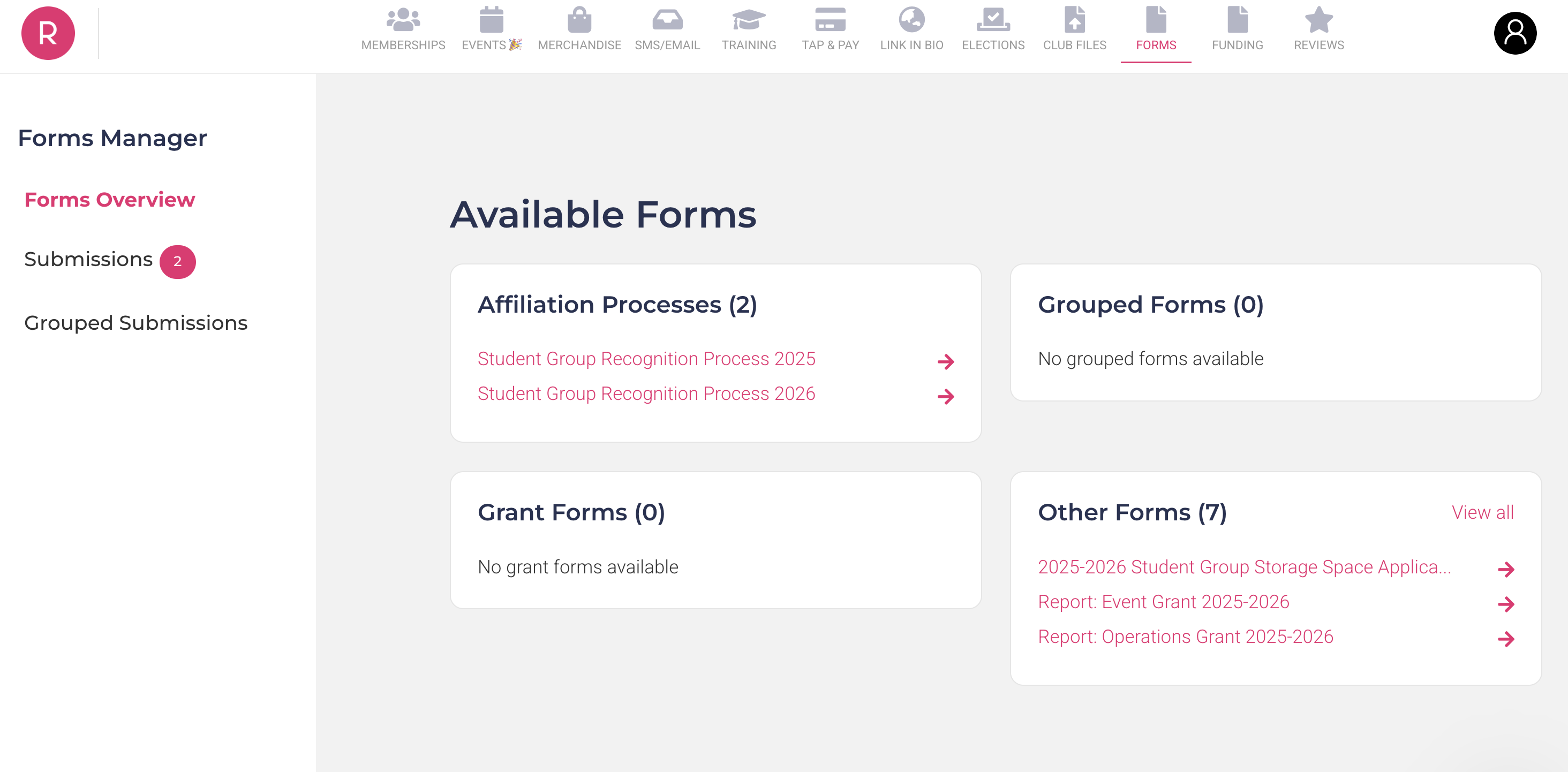
The forms we'll be discussing are part of the "Other Forms" category. For details regarding re-registration (affiliation) forms, feel free to check out this page.
Finding Drafts & Pending Submissions
Once you've clicked on a form - Rubric will create a unique submission ID (multi-digit number) that can be accessed at any point. Regardless if it's only a draft, or has been fully submitted. To access these forms...
From there, you will have multiple tables displaying your different submissions. Whether they are drafted, approved, pending or denied. For the latter, a new specialty table labeled 'Action Required' will show up at the top of the screen. You will be able to view the denial, as well as any comments left by SGS staff members.
Now that we know how to submit and find previous submissions, lets go over the various forms available on Rubric.
Student Group Information Update Request Form
Student Groups that wish to update integral information about their organization, such as their constitution, name, or election month, can submit an Information Update Request (IUR) to ensure their changes are in compliance with all relevant policies.
Once you have accessed the Forms module on Rubric, click on 'Student Group Information Update Request Form'. The first question in the form will prompt you to select the purpose of your submission - you can select multiple at once.
(1) Organization Name (or) Acronym
If a group wishes to change their organization name or acronym (or, logo) they need to first submit a request to Student Group Services to ensure it meets compliance. During review, it is important to note that any usage of University of Alberta Trademarks must be reviewed by the Office of Trademarks & Liscensing (T&L).
To help your submission go faster, or pre-emptively before your annual re-registration, check out this page for what expectations exist for student groups. As well, how to get in contact with the Office of T&L.
(2) Banking Details
If a group has major banking detail updates (such as primary bank location changes) they must report it via the IUR form.
(3) Election Month
If a group is wanting to switch their annual election month, they need to do so in a timely manner dependant on their current election month. For example, a group with April elections that submits an election month switch during the month of April will still need to complete an approved re-registration before their current deadline. Failure to do so will temporarily disaffiliate a group, suspending student group benefits until the re-registration is approved. An election month switch only affects the following (next year) deadline.
When considering changing your election month, it is extremely important to consider all elements regarding transitional periods. Some questions to ask your team before making the decision:
- How will this change reflect your recruitment of new members?
- How will this change influence the effectiveness of transitioning new incoming executives?
- How much buy-in and initiative will your members showcase in this new month?
- Are there any additional calendar-conflicts (i.e. finals, events, etc) that may decease the band-width available to host elections?
(4) Constitution Update Request Form
If a group is requesting alterations to their last approved constitution, they must submit a document indicating such changes using the IUR. Those changes must be highlighted or clearly formatted, and if anything is out of compliance. An SGS staff member will deny the submission with a link to comments of required changes. Any group found to have made changes to their constitution without approval will have those changes not upheld.
Verification Letter Request Form
Student Groups that have outlined financial practices (written in their constitution) are able to request Verification Letters to help with transitions, grant reports, or general banking processes. Student Group Services reserves the right to request additional information as needed to fulfill the request, or to clarify any points of concern.
Once you have accessed the Forms module on Rubric, click on 'Verification Letter Request Form.' The second question in the form will prompt you to select the purpose of your submission - you can select multiple at once. Although each of these options have their own required information, if any additional fields are needed, there is a section at the end of each form to request such information.
(1) Opening a Bank Account
If your affiliated group has yet to open a community bank account, you can request one via this option. Note that you must have at minimum two, no more than four signing authorities assigned to elected, student-held (executive) positions. The bank must be selected prior to your request, and we recommend reaching out to bank branches (such as BMO, Scotiabank, CIBC) to see what options they offer.
It is also important to note that if you are transferring between banks - you will need this letter, as well as an additional 'Other' letter to express to the old banking branch that the account is to be closed.
(2) Transferring Signing Authorities
At least on an annual, the new incoming executive will need to be authorized to have financial oversight over the group's bank account. This can be requested after a group's annual re-registration is completed, or in specific circumstances (i.e. a by-election) so long as there is evidential support.
When submitting this request, ensure you have the full legal name of the outgoing signing authorities, as well as the incoming signing authorities. Banks typically request signatures of all parties, as well as government-issued ID to verify the executives.
(3) Award/Granting Applications
For groups looking for external revenue streams such as UASU or GSA grants, SGS can provide a letter outlining the group's affiliations status with the University of Alberta. Note that, this is only offered to currently affiliated groups - and the group's most-recent annual re-registration will of have to have been completed within the last year.
(4) Other
For any other banking inquiries not outlined by the three previous options, groups are encouraged to fill out this form with any applicable information.
Other (Conditional) Forms
A variety of forms are available dependant on the time of year, your group type, or general availability. A brief outline of the most frequently seen 'other' forms has been featured below for reference:
| Student Group Storage Space Application |
There are two types of storage applications. Annual long-term storage and Conditional short-term Storage. Both are subject to availability and are only for affiliated groups. Details of our student group storage program can be found here. |
| Student Group Granting |
[SEASONAL] Semesterly intake cycles for granting are available for affiliated groups, with specific types based on how the money is predicted to be spent. Details of our student granting program, including deadlines, can be found here. |
| Granting Report Forms |
[CONDITIONAL] When a group recieves a grant, it is the group's responsibility to submit a detailed financial report of the money spent based on the grant awarded. Details of our student group granting program can be found here. |