
Membership
Membership Overview
Rubric gives organizations the opportunity to manage multiple tiers of membership with different requirements, and registering processes. This page will teach you how to navigate membership features.
To access the membership information of your student group...
- Login to hellorubric.com using the Student Portal.
- You'll need to be assigned an executive role that has membership permissions.
- Click on the black icon in the top-right of the screen, and switch to the club management page.
- From the club management page, click on Memberships in the top navigation bar.
If done correctly, the page will look like this:
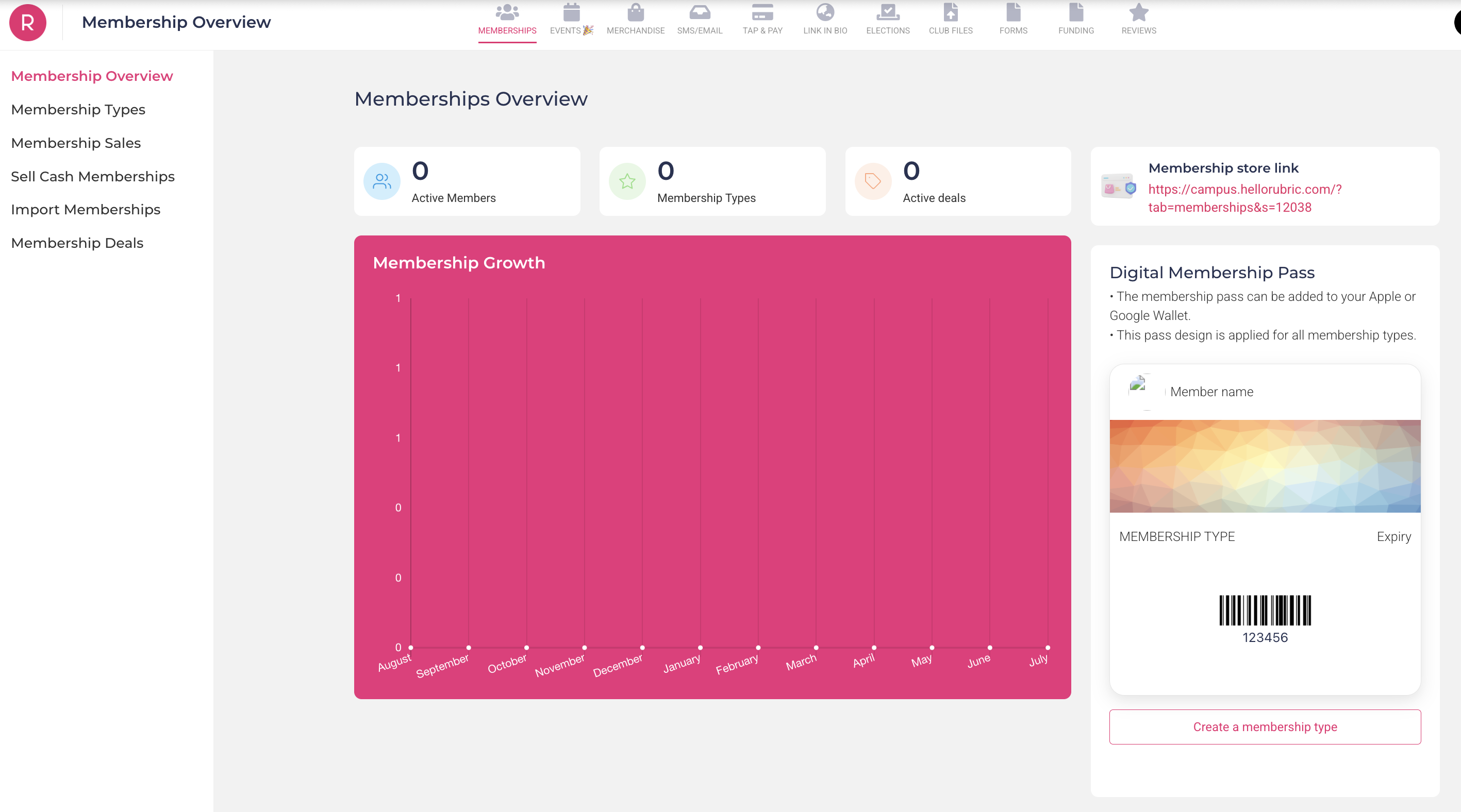
This is your Membership Overview page. It shows a plethora of information, including:
- Digital Membership Pass - This digital membership pass is downloadable by all your active members of your club, and can be used for attendance at events or meetings. More details can be found further down.
- Membership Growth - This graph shows the number of members that regsiter with your club in a given year, broken down month-by-month.
- Membership Total - The number of "Active" members is the current, total members in your group.
Membership Management
Organizing your membership is broken down into three key elements. Making membership types, editing membership types, and managing your membership information.
When first creating membership types, we need to consider a few different factors:
- What membership types are outlined in our constitution? (General, Executive, Associate, etc)
- How do our members engage with our organization? (Volunteers, Event Attendees, etc)
- How do we want to attract interested people to our club? (Prospective Members, Newsletter Subscribers, etc)
Once you have an idea of how you want to manage your members, you can create a new membership type:
- On the left-bar, click on "Membership Types"
- Above the display table, click on "Create Membership" and select "New Membership Type"
When creating your memberships, there are a couple different fields that need to be developed:
- Name - The formal title of a given member. This is what will be displayed on their Digital Membership Pass.
- Validity - The length of time a membership is valid for from the date of purchase/joining. It is mandated to have them no longer than one year.
- Note that you will use the custom field setting to set the end-date.
- Membership Price - The cost of being this type of membership. Groups can elect to have membership be free ($0.00) or they can set a price.
- Note that Rubric has transaction fees that can either be paid by the group, or it can pass onto the buyer.
- Membership Description - The general information about this type membership. It is reccomended that groups have them written in their constitution; brief and concise.
NOTICE: Groups that are found with a type whose validity exceeds one year will have members of that type be disqualified from their total member count.
There is also a Membership Sign-Up Form that members will fill out when becoming a member of a given type. A brief rundown of this section is as follows:
- Required Information - All membership types will require the Name, Email, and Enrollment Status of a member.
- Optional Information - Rubric has pre-made form questions (i.e. degree, year of study) that groups can opt-in to use for their membership types. Under no circumstances can you request Student Identification Numbers (ID).
- Additional Questions - You can add customizable questions (optional or mandatory) at the end of the form. Including drop-downs, checkboxes, multiple-choice, or text-based answer fields.
- Terms & Conditions - A brief description outlining the terms & conditions of memberships, and acquiring this type of membership. We reccomend student groups add their expectations for good standing here.
At the end of the membership creation page, there is a Manual Membership Approval toggle. This means that when people choose to join your group, you need to approve them from the main membership page before they are added. Note that, this toggle cannot be turned off after the membership is created (or vice versa).
Once you finished creating a membership type, it will appear in the original Membership Type chart:
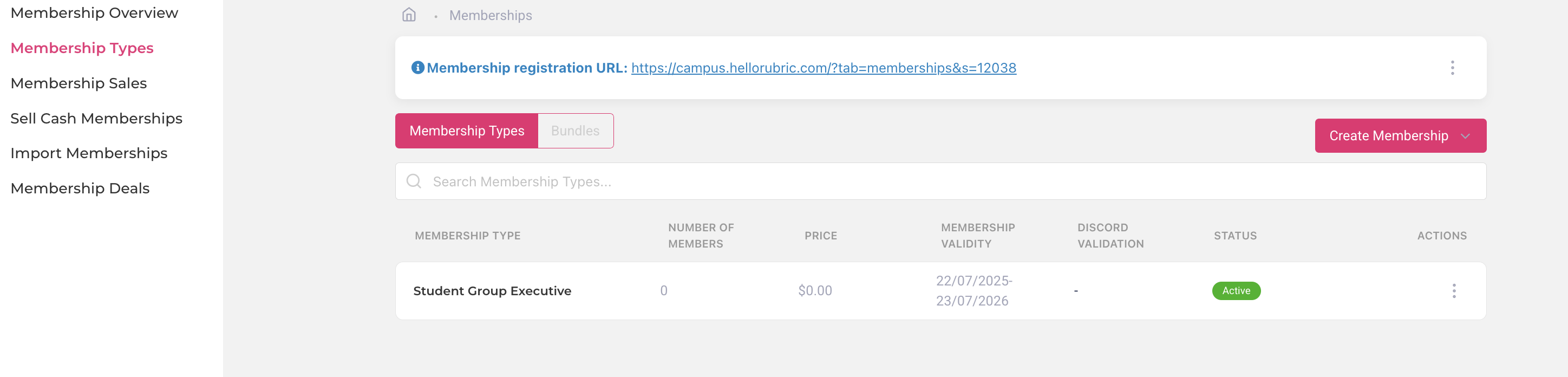
The status of a membership type indicates
If you want to edit a membership type, click the three-dots on the furthest right-hand side, and click "Edit".
Membership Templates
Here you can find membership type templates suitable for Rubric, with additional comments explaining the rationale. Student groups are encouraged to utilize these templates as they set up or reorganize their student group pages on the platform.
Prospective Member
Having a type for prospective members is a great way of having a low-commitment trial for students interested in joining your organization. This is also a great way to ensure that your General Members are formally recognized in an invite-only type, and are distinctively separate from people who do not meet requirements of membership as outlined in your constitution. You can also opt to transfer prospective members who do not meet requirements of general membership to the Associate Member type, as outlined below.
| Validity - 1 Semester |
To avoid a backlog of interested people who initially sought out your club but lost interest, set the membership to last a short time. Then, those who meet membership requirements by the end of the semester can be transferred over to your general member type. Anyone who does not meet the requirements can renew prospective member status, or change to an associate member. |
|
| Price - $0.00 |
Charging a fee for a prospective membership will (most likely) lead to a lack of interest. The price is up to the discretion of the student group; note that Rubric has a transactional fee for any purchases on their platform. |
|
| Description |
Descriptions should match what is outlined in the constitution of the organization. An example is as follows:
Interested in joining our student group? Prospective members get all our communications for upcoming ways to get involved - including volunteering, events, and more! Sign up now to find out if [Student Group Name] is the right fit for you! Please note that prospective members do not have voice or vote in group matters until they become general members. |
|
|
[OPTIONAL] Terms & Conditions |
You can add a terms and conditions if you feel the need to stress any additional information, or conduct of students. An example is as follows:
By obtaining this membership, you agree to abide by our group’s Constitution, and all policies of the University of Alberta and [Student's Union/Graduate Student's Association]. Failure to abide by these policies may result in the following but not limited to: bad standing, suspension of membership, and expulsion from the group. In order to upgrade to general membership status, you must be currently enrolled as a University of Alberta students, attend at least one event in the past semester, and be in good standing. |
|
| Viewing - Active |
Set the membership to active so anyone on Rubric can view and join automatically! |
|
| [OPTIONAL] Additional Questions |
Additional questions are a great way to understand the general reputation of your organization. Here are some examples:
Additional questions are great if you have more information required for recognizing your members, or for getting some statistics for your club! Some examples include:
The additional questions can be formatted depending on the answers you are interested in obtaining (multiple choice, select-all, dropdown, short answer, etc). We strongly recommend making these sections optional. |
|
General Member
General Members are a type of membership that includes all University of Alberta students who are members (including executives). There can be additional requirements to become a general member of the group as outlined in your constitution.
| Validity - 1 Year |
Members must re-register with their student groups on an annual basis. All membership types must expire after one year. |
|
| Price - $0.00 |
The price is up to the discretion of the student group; note that Rubric has a transactional fee for any purchases on their platform. |
|
| Description |
Descriptions should match what is outlined in the constitution of the organization. An example is as follows: |
|
|
[OPTIONAL] Terms & Conditions |
A terms and conditions section is a great way of outlining good & bad standing for your student group. An example is as follows: |
|
| Viewing - Hidden |
General Membership is for verified members of your student group that meet the requirements as outlined in your constitution. If you hide the membership, only people you invite can join. |
|
| [OPTIONAL] Additional Questions |
Additional questions are great if you have more information required for recognizing your members, or for getting some statistics for your club! Some examples include:
The additional questions can be formatted depending on the answers you are interested in obtaining (multiple choice, select-all, dropdown, short answer, etc). |
|
Associate Member
Having a type for associate members is a great way of keeping track of individuals who might not want to be general members, or might not even be eligible to become general members, but want to stay in the loop with what your club is up to.
| Validity - Custom Range |
Set the range to a custom date that expires when your annual event calendar resets; a good date would be the date of your upcoming annual elections, or the end of the academic year. Please note that if you allow lifetime associate memberships, you may have to remove folks if your membership ratio no longer satisfies the requirements of student group recognition. |
|
| Price - $0.00 |
Charging a fee for an associate membership will (most likely) lead to a lack of interest. |
|
| Description |
Descriptions should match what is outlined in the constitution of the organization. An example is as follows: |
|
|
[OPTIONAL] Terms & Conditions |
A terms & conditions section is a great way of outlining the expectations of volunteers:
By obtaining this membership, you agree to abide by our group’s Constitution, and all policies of the University of Alberta and [Student's Union/Graduate Student's Association]. Failure to abide by these policies may result in the following but not limited to: bad standing, suspension of membership, and expulsion from the group. |
|
|
Viewing - Approval [OPTIONAL] |
Set the membership to manual approval so anyone can show interest in joining the group, but will need to have it be approved (application looked over) before they are accepted. |
|
| [OPTIONAL] Additional Questions |
Additional questions are great if you have more information required for recognizing your members, or for getting some statistics for your club! Some examples include:
The additional questions can be formatted depending on the answers you are interested in obtaining (multiple choice, select-all, dropdown, short answer, etc). |
|