
Frequently Asked Questions About Rubric (draft)
Believe it or not, lots of clubs have the same issue! Student Group Services compiles all of the most frequent problems, creates simple solutions, and lists out step-by-step instructions for future reoccurrences. Check this page to troubleshoot before reaching out to our team!
I can't find a student group or event on the Rubric search page.
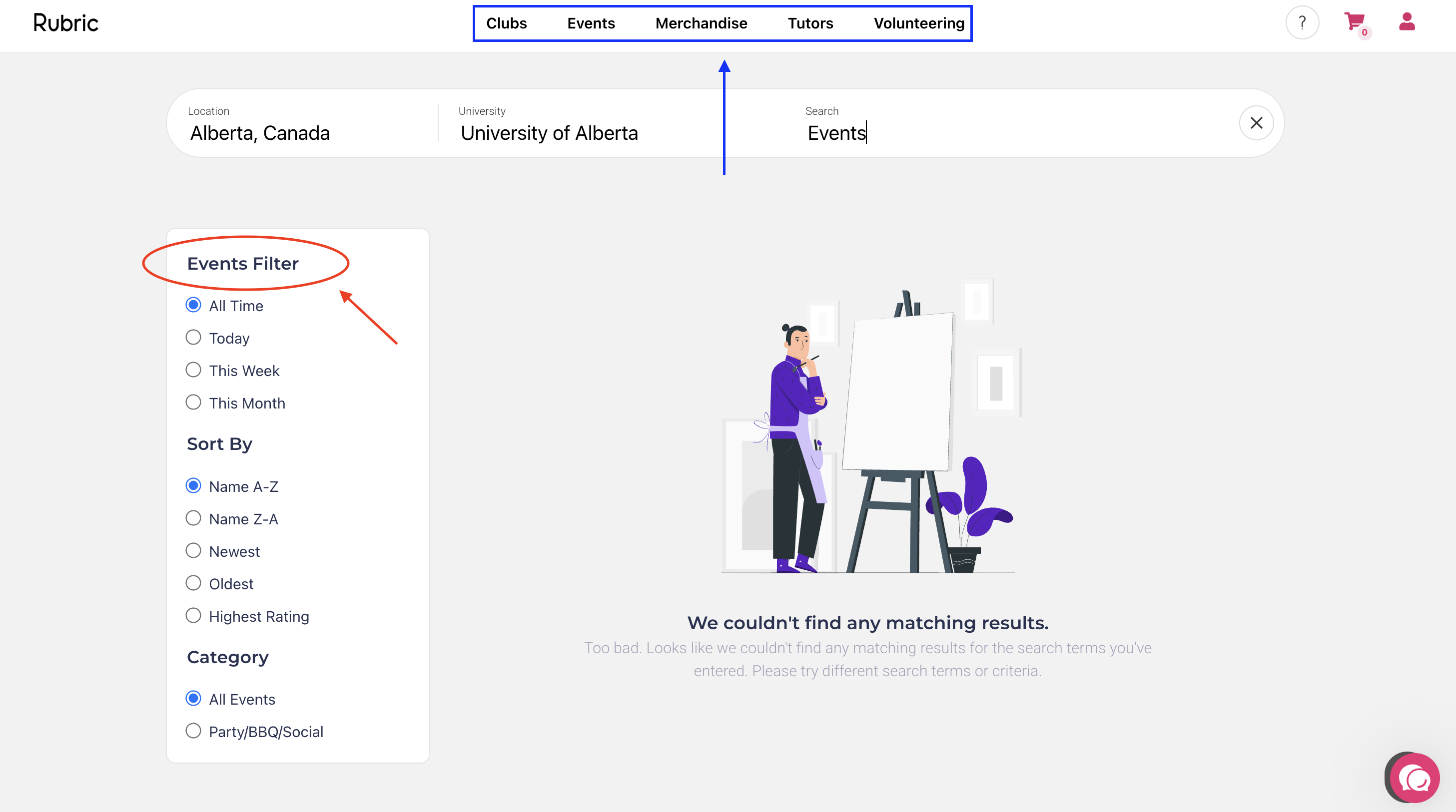
There are two search queries on Rubric: Events and Societies. First, you will need to ensure the location and University are properly selected (Alberta, Canada and the University of Alberta). To ensure you are on the right database, refer to the top of the filter on the left-side of the screen (red circle). If you want to switch between databases, refer to the navigation bar at the top of the screen (blue rectangle).
If you still cannot find a specific student group or event on the database, this is because the group is not currently affiliated, or the event has not been approved yet. Only affiliated groups and approved events will show up in the public version of the database.
I missed my group's registration deadline! What happens to our Rubric account?
If a group has not submitted your registration, or a registration is not approved by the group's affiliation deadline, the group will be frozen, AKA disaffiliated. A group that is not affiliated is unable to submit events, manage members, hold elections, etc. If this has happened to your group, you can be reaffiliated by submitting and receiving approval of their registration.
What does it mean when my group is affiliated or disaffiliated on Rubric?
Rubric's terminology differs from our old platform - but the concepts are quite similar! Here's a breakdown of some terms you may encounter, and what they mean.
BearsDen Term |
Rubric Term |
Definition |
|
Active
|
Affiliated |
The status of groups that has submitted annual registration and met all the requirements of recognition, resulting in the approval of their registration. These groups are able to access all available features on Rubric and all the privileges of student group recognition. |
|
Frozen
|
Disaffiliated |
The status of groups that fail to obtain an approved registration by their deadline. The group will have little to no access to Rubric's features until they obtain approval of their registration. |
|
Deactivated |
Archived |
The status of groups that have been disaffiliated for over a year following their registration deadline. The group's account will no longer be accessible, and they will not be eligible to reregister. |
Learn more about student group recognition and registration here!
I don't have access to my club's email! How do I get into my club's Rubric account?
Groups that cannot access their club email inbox will need to have their Rubric account email changed by Student Group Services. The group's President can reach out to clubs@uasu.ca to request this change so they can access the account, submit registration, and receive email updates about the status of their submission. Rubric account emails must be switched back to a club email after registration is approved.
Please note that if your group's CCID email address has expired, you will not be able to renew it until your registration is approved. For more information, check out this resource page. If your group email is not a group CCID email, Student Group Services cannot help recover the account.
I can't edit the name of (or delete) certain positions on Rubric.
Rubric has four default positions: President, Secretary, Vice President, and Treasurer. These positions cannot be deleted or have their names removed. These roles can, however, have their permissions altered, and can remain unassigned. If you have no use for these roles (i.e. they are not listed in your constitution) keep them unassigned and they will not show up on your executive roster.
I am a group executive, and I cannot access features on my club management page.
Only student accounts assigned executives roles with specific permissions can access specific pages. Try troubleshooting these issues:
- Are you logging into the student portal, and switching to the club management page?
- Is your group affiliated?
- Are you assigned as an executive?
- Does your role have the right positions?