
Frequently Asked Questions (FAQ) About Rubric
Believe it or not, lots of clubs have the same issue! Student Group Services compiles all of the most frequent problems, creates simple solutions, and lists out step-by-step instructions for future reoccurences. Check this page to troubleshoot!
I missed my group's registration deadline!
- Groups that are unable to obtain an approved registration by their deadline are set to automatically disaffiliate on the platform - meaning they are unable to process events, manage members, hold elections, etcetera.
- If this has happened to your group, it you can be reaffiliated by submitting and obtaining an approved registration. If you need further instruction, email clubs@uasu.ca with a detailed explanation of the situation.
I don't have access to my club account email!
- Group emails can be reset by Student Group Services as long as the person reaching out is the group's primary officer (i.e. President or equivalent).
- If your UAlberta Group Email has expired, please reach out to (insert IT)
- If your group email is not UAlberta, please reach out to clubs@uasu.ca.
I can't find a student group on the Rubric search page.
- There are two search queries on Rubric: Events and Societies.
- You will need to ensure the location and University are properly selected (Alberta, Canada and the University of Alberta).
- If both of those search filters are correct, then you are not using the right search bar!
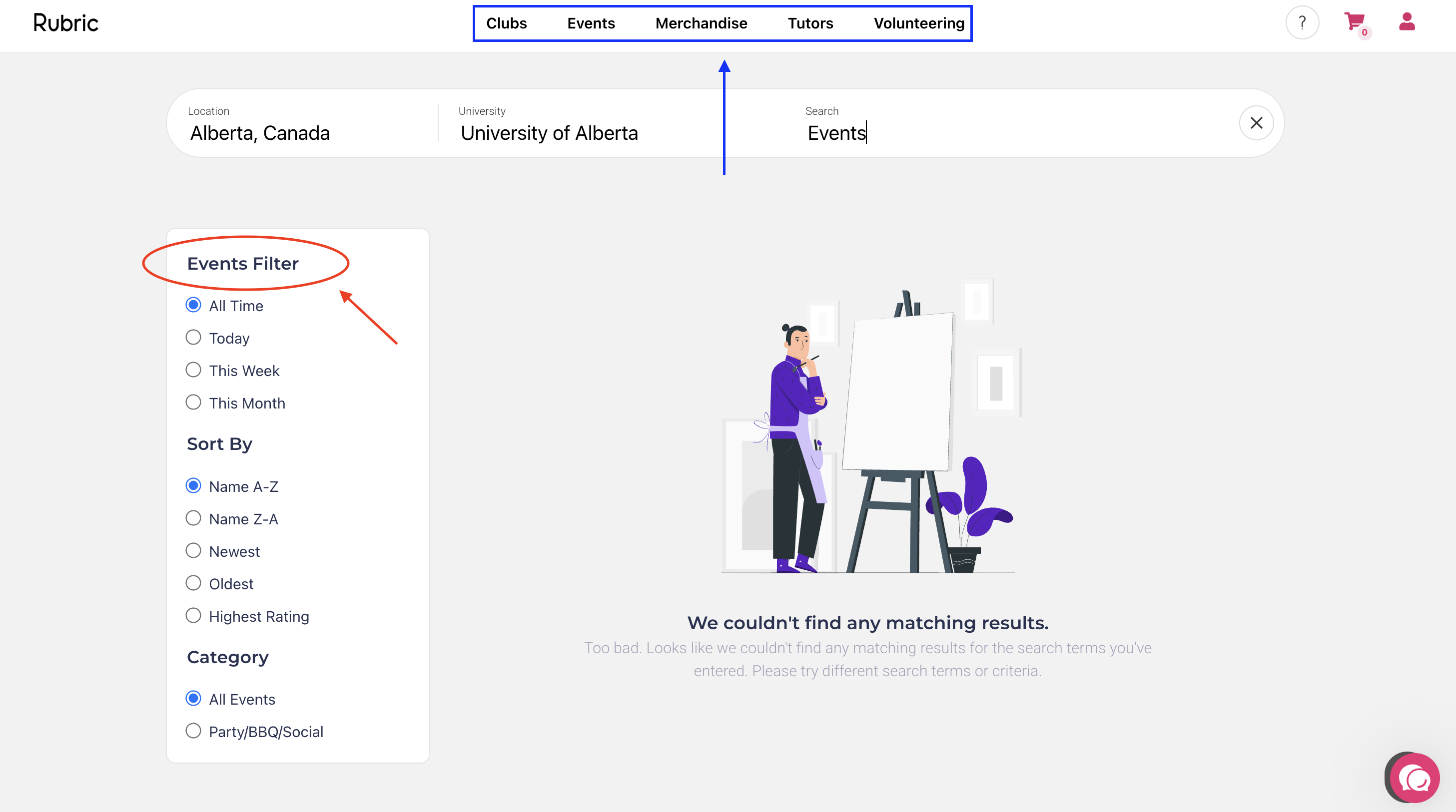
- To ensure you are on the right database, refer to the top of the filter on the left-side of the screen (red circle):
- If you want to switch between databases, refer to the navigation bar at the top of the screen (blue rectangle):
I can't edit the name of (or delete) certain positions on Rubric.
- Rubric has four default positions: President, Secretary, Vice President, and Treasurer. These positions cannot be deleted or have their names removed.
- These roles can have their permissions altered, and can remain unassigned.
- If you have no use for these roles (i.e. they are not listed in your constitution) keep them unassigned and they will not show up on your executive roster.
I made my own group account for my club, but I don't have access to Rubric's features.
- Student Group Services requests that you do not create your own group account unless you are proceeding as a new/reactivated group.
- If you have made your own group account (as a re-registering student group) please reach out to clubs@uasu.ca for further assistance.
I am a group executive, and I cannot access features on my club management page.
- Only student accounts assigned executives roles with specific permissions, can access specific pages. Try troubleshooting these issues:
-
- Are you logging into the student portal, and switching to the club management page?
- Is your group affiliated?
- Are you assigned as an executive?
- Does your role have the right positions?
-
What does it mean when my group is disaffiliated on Rubric?
- Rubric's terminology differs from our old platform - but the concepts are quite similar!
OLD TERMINOLOGY |
NEW TERMINOLOGY |
|
ACTIVE
|
Affiliated - For groups that renew their annual registration before their deadline. They are able to access the full scope of Rubric and all the privileges of student group recognition. |
|
FROZEN
|
Disaffiliated - For groups that fail to obtain an approved registration by their deadline. The group will have little-to-no access to Rubric's features until they obtain approval. |
|
DEACTIVATED |
Archived - For groups that have been disaffiliated for six months following their registration deadline. The group will no longer be featured on Rubric, and will lose their recognition as a student group. |